
This page lists common questions with detailed answers on getting set up. Included are answers on password resets, site modifications, controllers, and part numbers.
I cannot log into the platform. What are the steps to reset my password?
If you know the email used to log in, use the forgot password option. After clicking Forgot Password, a reset link will be emailed. Refer to Login Support for additional information.
What should I do if encounter issues with the gateway serial number?
The gateway serial number may not be in use by other equipment. If you receive an error when doing a site deployment, be sure to note the gateway serial number and IMEI from the nameplate. Then contact Support with that information.
What should the user do if they get an error with the Save and Download step in the Site Deployment Wizard?
If there is an error displayed after the Save and Download step, this may be an indication of a temporary loss of communication with the gateway. If the issue persists, reach out to Support.
Why isn’t the controller type in the drop-down menu in the Site Deployment tool?
Dropdown menus for the factory-attached versus aftermarket gateways have different controller options. Additional controller menu options can be added. Please reach out to a solutions engineer for next steps.
Can I make changes to a site name or location after going through the Site Deployment Wizard?
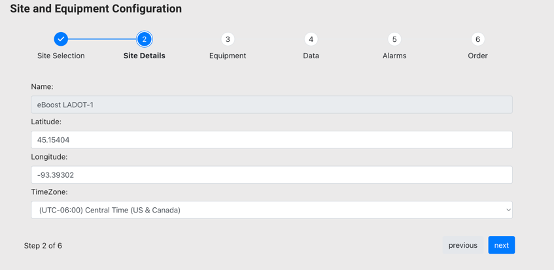
From the Site and Equipment screen, once the user has proper permissions, the Latitude and Longitude field values can be modified. Site name also can be modified through this page. This may apply if the generator is situated at a different location than the postal address, for example, for a large site with many buildings. Or, importantly, if the equipment is rented out or mobile.
-
To submit a change, enter the updated latitude and longitude under site details, then click next.
-
Click through using the next button until reaching the final screen (step 6), then click save.
How should we proceed if the gateway reboots when a generator start is initiated?
This could be because the power supply of the gateway is connected to fused contacts instead of the battery posts of the generator. Try these steps to fix the issue:
-
Connect the power supply of the gateway to the battery post and test the remote start again.
-
If the gateway reboots again, check the voltage output of the battery. If the voltage value is less than 9V, the battery needs to be replaced.
Should port communication settings ever be checked or updated?
Some customers have reported connectivity issues if the default baud rate values are left unchecked in the Communications module. The baud rate normally must be entered explicitly as 9600. Be sure to refer to the Port Programming topic for further instruction and/or if modifications to the baud rate entries are needed.
Ports 443, 5671, and 8883 need to be opened for outbound traffic at the facility firewall if applicable.
Which features are used to monitor fuel levels?
Live streams and reporting on fuel levels present a tangible value for backup power use cases for obvious reasons. Provided the generator is equipped with a fuel sensor, fuel data will populate the equipment summary screen for an individual generator or across a fleet in summary pages. These quick views are typically just a click away.
Moreover, trend plots for fuel levels will help the user pinpoint usage patterns and any outliers. These values, expressed as a percentage, also appear in the Generator Run Report.
Importantly, alarms are triggered when levels are depleted to a particular threshold. And notifications for low fuel can be forwarded to fuel providers to ensure tanks are topped off in time for an event.
In order to enable the data stream for fuel levels, generators need a fuel sensor that can either plug into the gateway directly or via the controller.